
The Problem
Every AI coding tool (Cursor, Claude Code, OpenCode) can connect to external services through the Model Context Protocol (MCP). Slack has MCP servers. But the moment you connect an AI tool to Slack, you hand it a bot token with full access to every channel, every message, every user in your workspace.
For a solo developer, that is fine. For an enterprise with 500 people, regulated channels, and compliance requirements, it is a non-starter.
We needed something that sits between AI tools and Slack: a permission layer where each user controls what their AI can access, admins can block sensitive channels org-wide, and every request is authenticated and scoped.
This project also represents a broader point for business leaders: you can build custom, purpose-built integrations to any tool your organization uses. These do not need to be publicly maintained or distributed. They are private apps, built rapidly, deployed internally, and fully controlled by your team. You are not limited to what is available on a marketplace. And when a third-party connector or plugin does exist, there is no reason to avoid it either. The key is having engineers who can evaluate, build, or extend these integrations on demand.
So we built it. In one continuous AI-assisted engineering session.
What We Built
MCP Orchestrator: a Slack app that lets workspace members generate scoped MCP configurations for their AI tools.
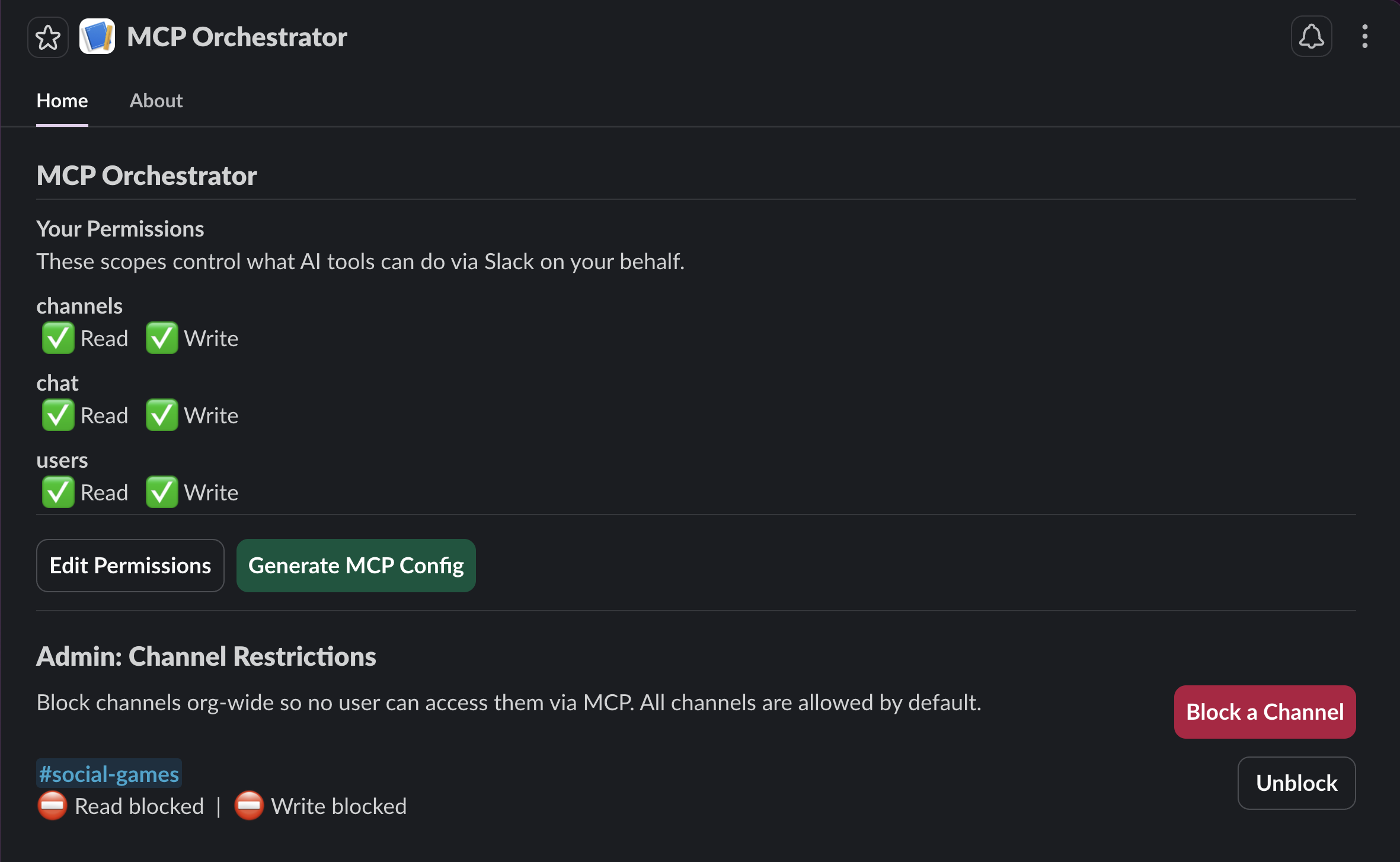
The setup is simple:
- An admin installs the app to the workspace
- Each user opens the app in Slack, chooses their permissions (read channels, write messages, list users)
- They click "Generate MCP Config" and get a JSON blob to paste into Cursor, Claude Code, or OpenCode
- Their AI tool connects to Slack, but only with the permissions they chose
- Admins can block specific channels org-wide so no AI tool can touch them
The bot token never leaves the server. Users get a scoped JWT that proves who they are. The server decides what they can access on every single request.
How We Built It
We used Cursor with the new Claude Opus 4.6 (1 million token context) as the AI coding assistant. This was our first real project with the model, and the results were impressive. The entire app, from first npm init to production deployment on Fly.io with a published npm package, was built in a single session.
Here is how the conversation went.
Starting Point: A Blank Slack Template
We started with the official Bolt TypeScript starter template and a Slack CLI sandbox workspace. The first prompt was straightforward:
"Initialize the server using the Bolt TypeScript template. Validate the Socket Mode connection, resolve any startup errors, and confirm the app responds to Slack events before proceeding."
Within minutes, the Slack app was running locally via Socket Mode, responding to events, publishing an App Home tab. The scaffolding was ready.
Architecture Decision: What's Possible?
The next prompt defined the product:
"Design a Slack app that generates and orchestrates per-user MCP configurations. Requirements: (1) Admin view showing all workspace users and their permission states. (2) Organization-wide default permissions configurable at install time. (3) A request tracking dashboard for audit visibility. (4) User-facing view where each user sees their assigned permissions and can generate a scoped MCP config. The config output must be a JSON payload containing a unique, user-bound token suitable for pasting directly into Cursor, Claude Code, or any MCP-compatible tool. Non-negotiable constraint: security-first architecture. Every token must be scoped per user, every request authenticated, and no bot token may ever be exposed to the client."
The AI assessed feasibility, identified bottlenecks (token security, MCP server hosting, Slack API rate limits), and proposed a full architecture with data flow diagrams. We chose SQLite for storage, JWTs for per-user tokens, and a stdio MCP client package that users install via npx.
Simplifying Scope
The initial plan included admin views, org-wide defaults, and analytics. We cut it:
"Remove the admin layer entirely. Scope this to user-level self-service only. Each user manages their own permissions manually. Keep the security model unchanged."
This is a pattern we see constantly in AI-assisted development. You start broad, validate the architecture, then ruthlessly scope down to what ships. The AI adapted immediately: removed the admin logic, gave every user a self-service view, and kept the security model intact.
The Iteration Loop
What followed was a tight build-test-fix loop:
- Build: The AI wrote the SQLite schema, JWT auth module, permission engine, MCP API proxy, and Slack UI handlers
- Test: We installed the app in Slack, clicked buttons, watched logs
- Fix: "Generate MCP Config is not opening." The AI found the error in Slack's API response (
invalid_arguments: must define submit to use an input block in modals), fixed it, redeployed
This loop repeated for Enterprise Grid compatibility (API calls need team_id), ESM/CJS import issues (ExpressReceiver not available as named export), and native module compilation for Docker (better-sqlite3 ELF header mismatch).
Each issue was diagnosed from logs and fixed in under 2 minutes.
Going Multi-Tenant
The turning point came when we asked about deployment:
"Prepare this app for Slack Marketplace distribution. Requirements: any workspace that installs the app must receive dynamically generated URLs and credentials. No hardcoded environment variables per tenant. The deployment must support multi-tenancy out of the box."
This triggered a full rearchitecture:
- Socket Mode replaced with
ExpressReceiver(HTTP mode) - In-memory token storage replaced with SQLite-backed OAuth installation store
- Single hardcoded bot token replaced with per-org token lookup
- Two servers (Bolt + Express) merged into one
- Dual-mode startup: Socket Mode for local dev, HTTP mode for production
The AI made all these changes, built successfully, and the app worked in both modes without manual intervention.
Adding Admin Controls
Once the core was stable, we added admin channel restrictions:
"Add an admin-level channel restriction system. Admins must be able to view all workspace channels, then toggle read and write permissions on or off per channel. When an admin blocks a channel, that restriction applies organization-wide, meaning no user's MCP token can access the blocked channel regardless of their individual permissions. Enforce this server-side, not client-side."
The AI built a complete channel blocklist system: new database table, CRUD operations, Slack Block Kit UI for admins (with block/unblock buttons), and server-side enforcement in the MCP API. All deployed and verified working in one iteration.
Deployment
We deployed to Fly.io. The first attempt failed. The web UI gave a cryptic "Failed to create app" error. Turned out Fly.io requires a credit card on file even for the free tier. We installed the CLI instead and deployed from the terminal.
The first deploy crashed: better-sqlite3 had an invalid ELF header. The macOS native binary was leaking into the Docker build context. Fix: added .dockerignore and npm rebuild better-sqlite3 in the Dockerfile.
Second deploy worked. Health check passed. Production URL live.
Publishing
The local MCP client package was published to npm as @agentiqus/slack-mcp-client. Users can now npx it directly from the generated config.
The Result
| Component | What it does |
|---|---|
| Slack App (Fly.io) | OAuth install flow, App Home UI, MCP API proxy |
| SQLite Database | Installations, permissions, tokens, channel blocklist |
| JWT Auth | Per-user scoped tokens, instant revocation, 90-day expiry |
| npm Package | Thin stdio MCP server, forwards calls to the API |
| Admin Controls | Block channels org-wide, enforced server-side |
Security model: The Slack bot token never leaves the server. Users get a JWT that proves identity. The server decides access on every request. Permission changes revoke old tokens. Uninstalling the app deletes all data for that org.
Multi-tenancy: Each workspace gets isolated data. Org A's admin cannot see Org B's channels. Org B's users cannot access Org A's data. One deployment serves all workspaces.
What We Learned
AI-assisted engineering is not "AI writes code for you"
It is a collaboration. We made every architectural decision. We chose SQLite over Postgres. We chose JWTs over session tokens. We chose a blocklist over an allowlist. The AI executed those decisions at speed, but it also hit wrong paths that we corrected:
- It tried to use
search:readscope (not available for bot tokens) - It enabled Socket Mode in a manifest intended for HTTP deployment
- It forgot that Slack modals need a
submitbutton when using input blocks
The value is not in removing the engineer. It is in compressing what would be 2 to 3 weeks of work into a few hours.
The real bottleneck is decisions, not code
Writing the JWT module took the AI 30 seconds. Deciding whether to use JWTs vs. opaque tokens vs. Slack's own token rotation: that is the engineering work. The code is the easy part.
Production is where the real bugs live
The app compiled and ran perfectly locally. In production:
- Native modules compiled for macOS do not run on Linux
- Enterprise Grid workspaces need
team_idon every API call - Socket Mode cannot be used for Slack Marketplace apps
- Stale installation records from deleted apps poison the database
Every one of these was invisible in local development. The AI diagnosed each from production logs and fixed them, but only because we pushed to production early.
Try It
The MCP Orchestrator is publicly available.
- npm package: @agentiqus/slack-mcp-client
- Source: github.com/Agentiqus/Slack-MCP-Orchestrator
Built by Agentiqus · AI-First Engineering Consultancy